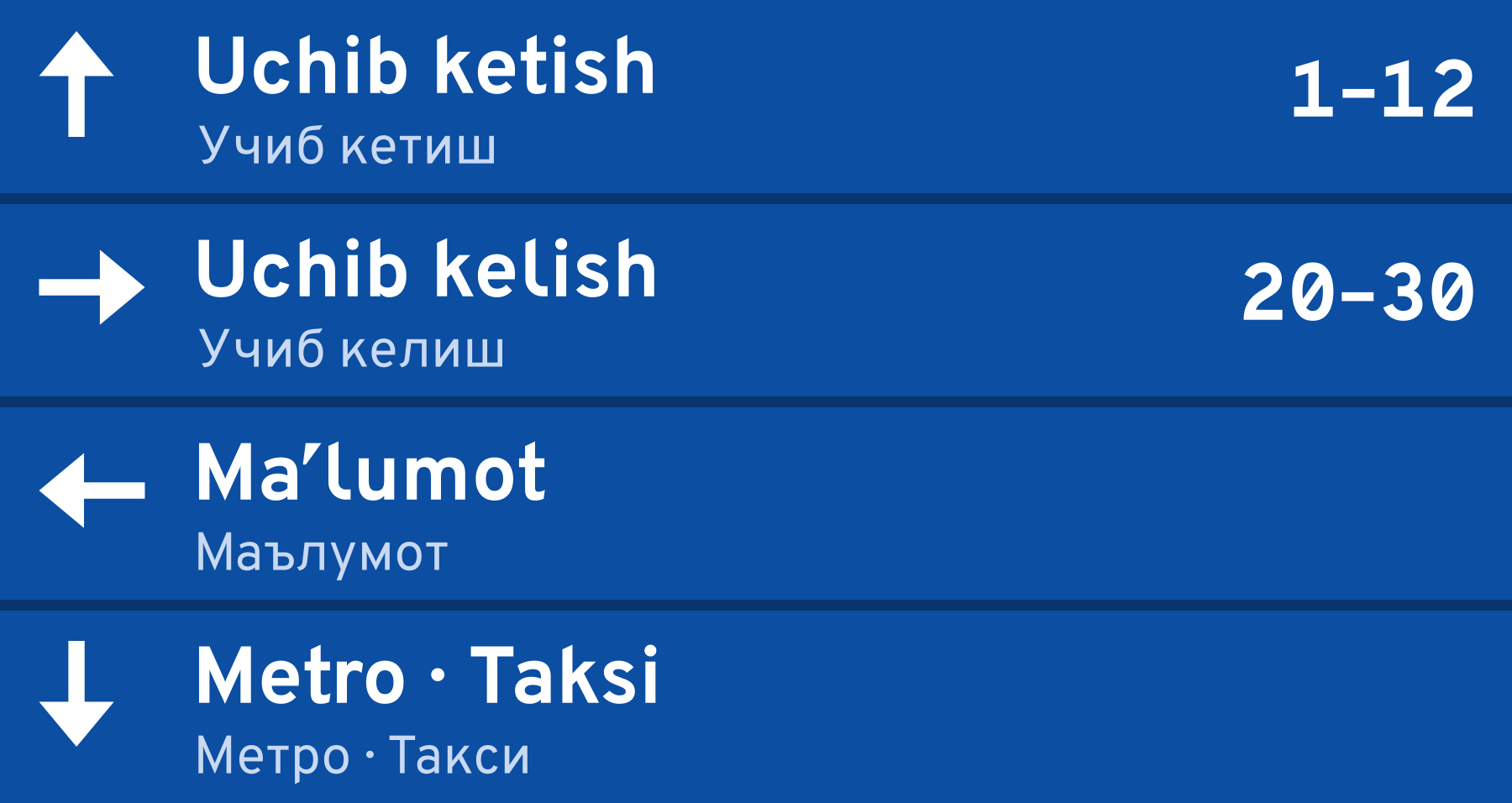
The workhorse font Ipak Davlat was made first of all for inscriptions: plates, wayfinding, gate numbers. The text on them is short; it is read on the move, from a distance, often at an angle. Here a small inaccuracy of the font turns into a reading error: a person sees the wrong letter or the wrong digit.
The font's base, Overpass, is a road font by origin. It grew out of Highway Gothic — the font of American road signs, designed to be read from afar and at speed. But even it had things to fix specifically for plates.
I and l
In most grotesques, the capital I and the lowercase l are one and the same vertical bar. In ordinary text this does not get in the way: the word is a hint. On a plate, the word may be unfamiliar, and the letter may come first. Uzbek has many such words: Ilm (science), Islom, Ilmiy. The reader cannot tell whether it is an I or an l.
The solution is an l with a tail: at the bottom the stem bends to the right. This way I and l cannot be confused even in an unfamiliar word. In Ipak Davlat this l is the default: the font is made for inscriptions, and distinguishability matters more than the familiar look.
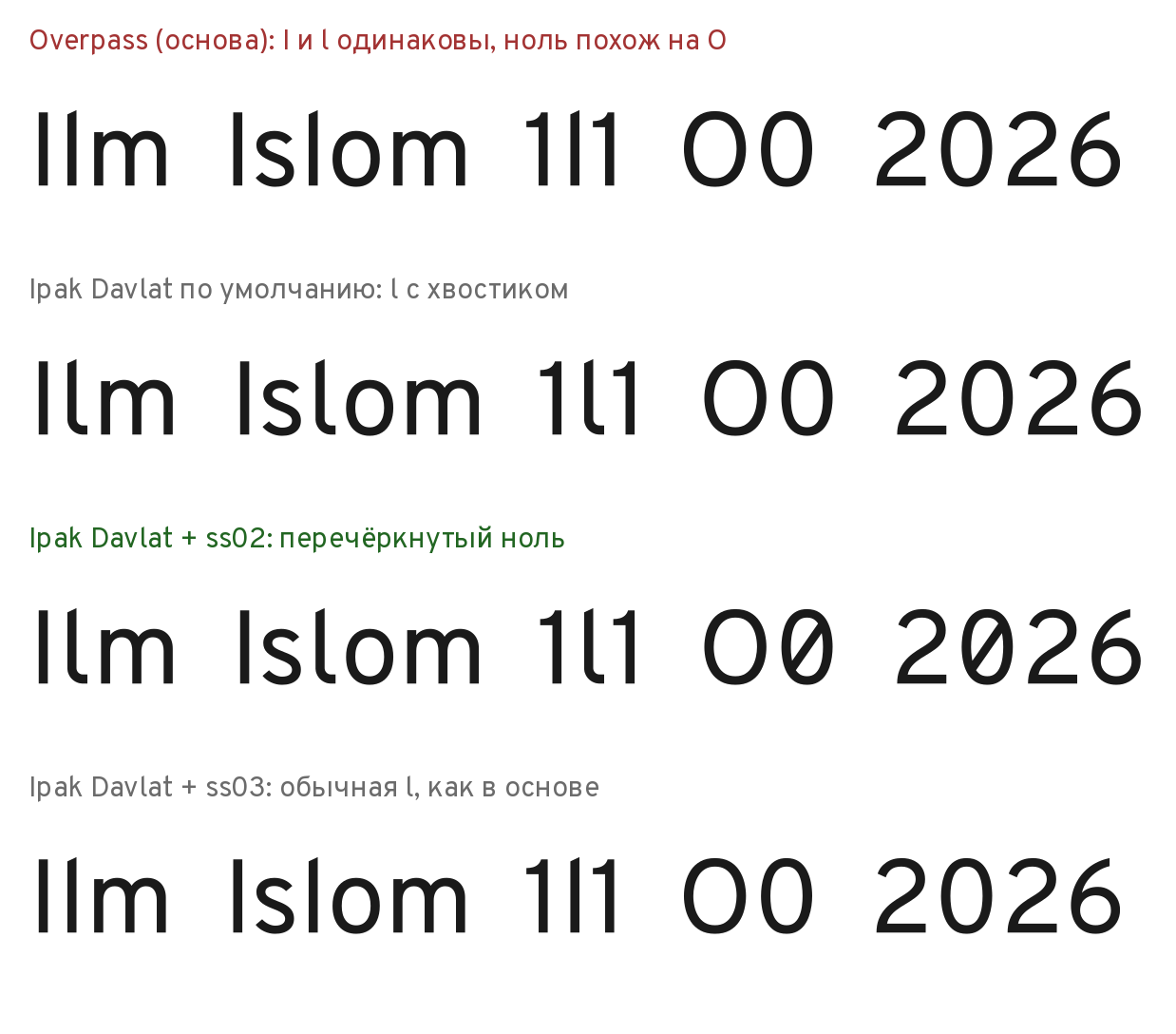
For those who need the ordinary l, there is the ss03 set, “Plain l”.
The tailed l took more fiddling than it seemed.
- The hole on the right. After the tailed l, the combinations ln and lo came out 13–25% wider than nn. The tail lies at the bottom, where there is plenty of air anyway. The right bearing was reduced by 0.45 of the stroke thickness — now the difference is within ±6%.
- Other people's letters. At first the tail was given to the l glyph itself. But ĺ ļ ľ ŀ and the fl ligature (two letters fused into one character) are assembled from it, and they stuck to their neighbors. A glyph is the drawing of one character in a font. The fix: the tailed l became a separate glyph at the same code, and the base's original l was left untouched.
- The Catalan l·l. Catalan has the combination l·l with a dot in the middle. The base's rule was waiting for the ordinary l. The tailed one was added to all such rules.
O and 0
The second classic confusion is the letter O and the digit 0. On a plate, “Exit 20” and “Exit 2O” are indistinguishable unless you already know. It is especially hard with flight, seat, and room numbers, where letters and digits come mixed.
The solution is a slashed zero, the ss02 set. It is enabled for wayfinding, numbers, and codes. The tabular zero is slashed too — a digit of equal width for table columns. So in a column-aligned timetable the zero also differs from the O.
Why not by default? In ordinary text a slashed zero looks technical. The zero in “2026” does not need to be told from a letter — the context is clear.
The middle dot that vanished
The middle dot · (U+00B7) separates items on plates: “Metro · Taksi”. The base had an error with it that we did not see for a long time.
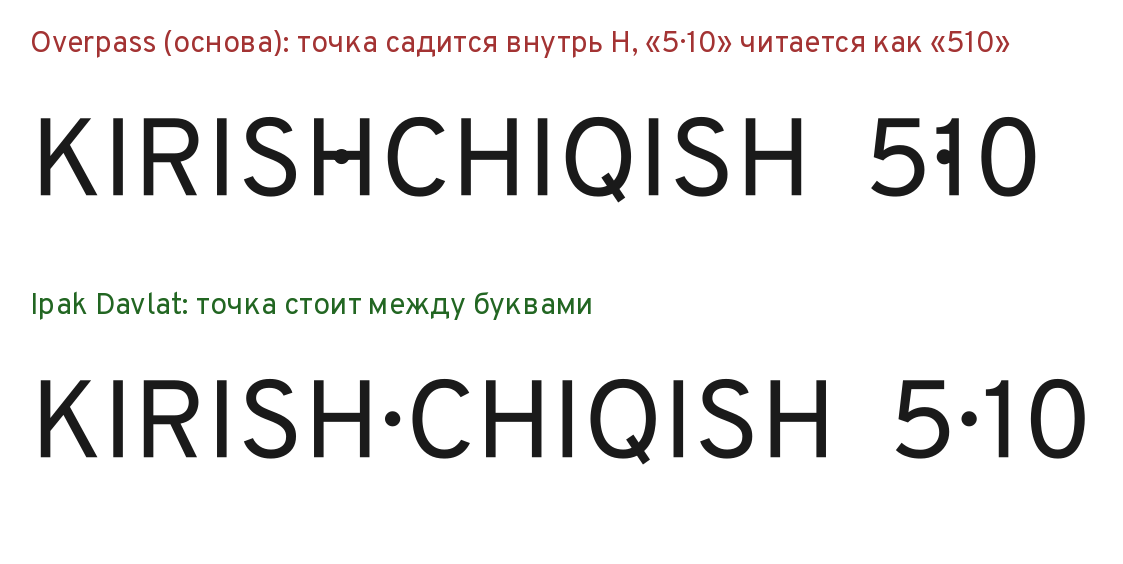
In Overpass, the dot was marked as a mark above the letter — like the dot over a letter, not as a separate character. Such marks take no space: they sit on the preceding letter. “5·10” read as “510”, and in “KIRISH·CHIQISH” (entry · exit) the dot landed inside the H.
The error was found during checking. We fixed the class in GDEF — and thought that was it. The next check found the same defect again: the dot was still landing inside the H. It turned out to be recorded in the “seat the mark on the letter” rules of GPOS as well. The first fix was incomplete. Only after the second one, when the dot was removed from those rules, did “5·10” become “5·10”.
The lesson we took away: what must be checked is the typeset result, not the table you fixed.
Arrows
The base's arrows were inconsistent. In ← → ↑ the shaft tapered toward the tail; in ↓ it did not. The widths differed: 1004 and 976 units. In one line, “← →”, this is noticeable.
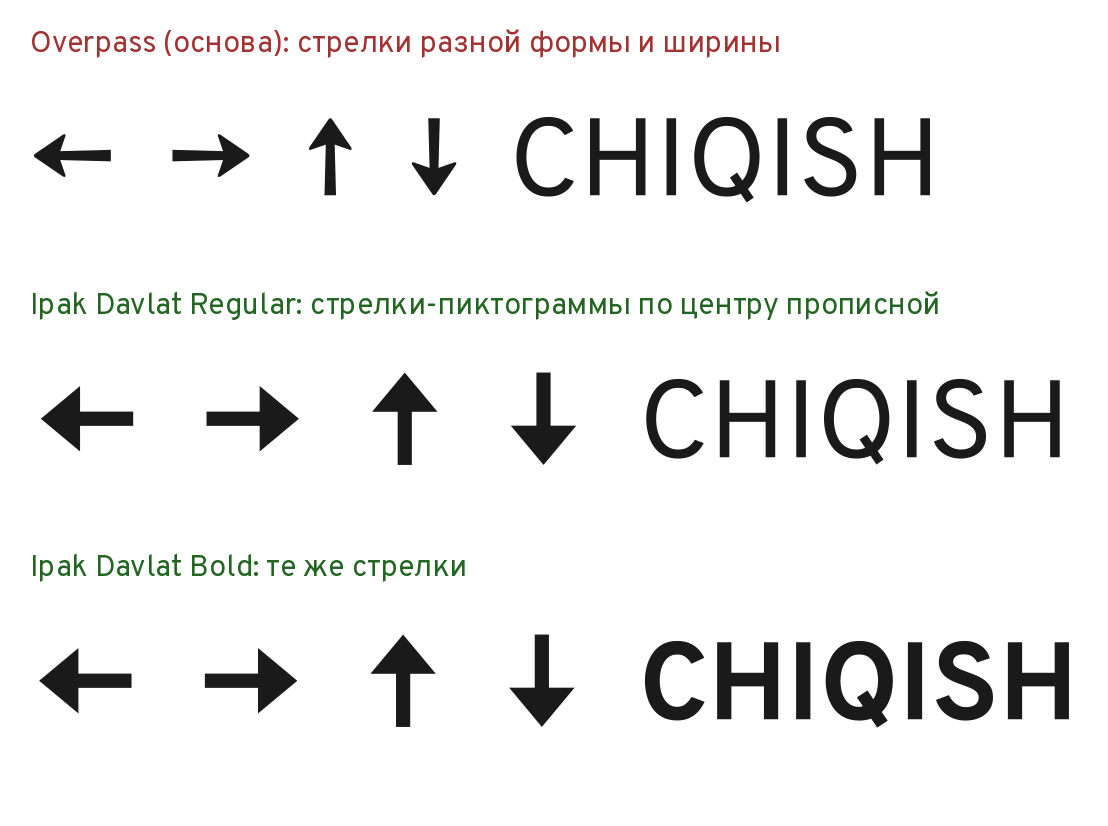
We drew our own arrows from one outline: the right one once, the rest obtained by rotation and mirroring. An even shaft, a triangular head, equal side bearings. The arrows went through three iterations.
- One shape. During checking, the difference between the base's arrows was noticed. We drew our own.
- Pictograms, not letters. Then the arrows turned out small — in Regular the head was half the capital height, and the proportions differed between Regular and Bold. We decided that an arrow on a plate is a pictogram. Now it is the same in both weights: Bold in weight, 1.2 capital heights long, with a head of 0.85.
- A shared center. Later it turned out that ↑ and ↓ stood at different heights; “↑↓” looked like a staircase. All four arrows got a common center — the middle of the capital height. Now they stick out of the line evenly, top and bottom.
The check at 9–16 pixels
From a distance, the eye sees a plate as small. So we looked at the font at small sizes (the font size) on screen — 9, 12, and 16 pixels.
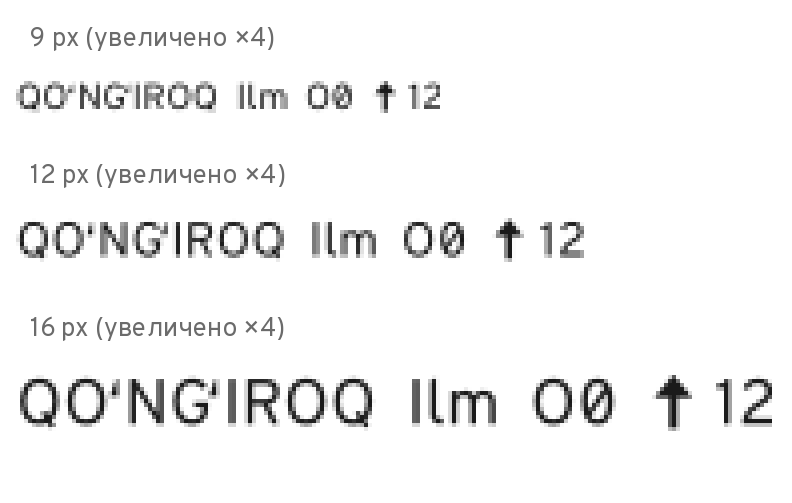
During checking, the control words were examined at 9 pixels. All are readable. The letters Қ Ғ Ҳ Ў, the I, l, and 1, the O and 0 with the ss02 set, the 5 and S, the 8 and B are all distinct. The arrows sit at the center of the capitals.
The ʻ and ʼ signs were checked separately. In the first version both looked like a “/” and differed only in the thickness of their ends. At small sizes this does not work. Now the ʻ has its mass at the bottom, the ʼ at the top, and the silhouettes face in different directions.
What we recommend for plates
Out of the checking grew a short list of usage rules:
- Bold is the primary weight for plates.
- Capital height on screen wayfinding: no less than ~12 pixels.
- For numbers — ss02; for columns of numbers — ss02 together with tnum (tabular digits of equal width).
- Put the “·” separator with spaces: “Metro · Taksi”.
The technical side was checked too. Font Bakery — a set of automatic font checks: the comments that remain relate to the Overpass base, not to the Uzbek layer. OTS — the check through which the Chrome and Firefox browsers pass web fonts before loading — found no complaints.
The result
None of these fixes is noticeable in ordinary text. The tail on the l, the slashed zero, the dot in its place, the even arrows — you notice them only when they are missing. But they are exactly what decides whether a person finds their exit at first glance.
Sources
- Highway Gothic and its purpose — Wikipedia.
- U+00B7 MIDDLE DOT, the arrows U+2190–U+2193 — the Unicode charts.
- Stylistic sets and tabular digits (tnum) — the OpenType specification, Microsoft Typography; glyph classes — the description of the GDEF table, same place.
- The slashed zero — Wikipedia, “Slashed zero”.
- Font Bakery and OTS — the projects' repositories.
- The fixes and measurements are ours, on the Ipak Davlat v0.1 build, October 2026.
Links:
- Highway Gothic — Wikipedia. https://en.wikipedia.org/wiki/Highway_Gothic
- Unicode: Latin-1 Supplement (U+00B7 MIDDLE DOT). https://www.unicode.org/charts/PDF/U0080.pdf
- Unicode: Arrows (U+2190–U+21FF). https://www.unicode.org/charts/PDF/U2190.pdf
- OpenType: stylistic sets ss01–ss20 and tnum (Microsoft Typography). https://learn.microsoft.com/en-us/typography/opentype/spec/features_pt
- OpenType: the GDEF table (glyph classes). https://learn.microsoft.com/en-us/typography/opentype/spec/gdef
- Slashed zero — Wikipedia. https://en.wikipedia.org/wiki/Slashed_zero
- Font Bakery. https://github.com/fonttools/fontbakery
- OpenType Sanitizer (OTS). https://github.com/khaledhosny/ots